
SEO work is difficult to improve if you cannot clearly explain what is happening.
You can publish content, fix technical problems, build internal links, improve page experience, and earn backlinks, but eventually someone needs to answer a simple question:
Is the SEO work actually producing results?
That is where SEO reporting becomes important.
A useful SEO report does more than display rankings or traffic graphs. It connects search visibility with website performance and, ultimately, business outcomes.
It should help you understand:
- whether organic visibility is increasing
- which pages are driving growth
- what people are searching for
- where rankings are improving or declining
- whether search traffic is converting
- which SEO activities are producing value
- where problems or opportunities exist
- what should happen next
The goal is not to create the largest possible dashboard.
The goal is to turn SEO data into decisions.
This guide explains how SEO reporting works, which metrics matter, what to include in a professional report, and how to avoid reporting numbers that look impressive but provide little useful insight.
What Is SEO Reporting?
SEO reporting is the process of collecting, organizing, interpreting, and communicating data about a website’s organic search performance.
A good report answers four questions:
- What happened?
- Why did it happen?
- Does it matter?
- What should we do next?
That last question is especially important.
A report that only says:
Organic traffic increased by 18%.
provides information.
A stronger report says:
Organic clicks increased by 18%, driven primarily by three recently improved SEO foundation articles. However, conversions remained flat, so the next priority is improving calls to action and internal paths from informational articles to commercial pages.
That turns data into an actionable insight.
Why SEO Reporting Matters
SEO rarely happens in isolation.
It may involve:
- content writers
- developers
- designers
- marketers
- business owners
- agencies
- executives
- clients
Each group needs to understand whether SEO work is moving in the right direction.
Good reporting helps create that clarity.
SEO Reporting Helps You Measure Progress
SEO strategies often take months to execute.
Regular reporting helps determine whether early signals are improving before major business outcomes appear.
It Helps Identify Problems
A sudden decline in organic clicks could indicate:
- ranking losses
- indexing problems
- technical changes
- declining search demand
- seasonality
- competitor improvements
- content becoming outdated
Reporting helps surface these changes.
It Helps Prioritize SEO Work
If one content cluster is growing rapidly while another receives little visibility, the data can influence where resources should be invested.
It Helps Connect SEO to Business Outcomes
Traffic alone does not pay the bills.
Good SEO reporting should eventually connect search performance to:
- leads
- sales
- revenue
- bookings
- subscriptions
- affiliate clicks
- downloads
- other meaningful conversions
SEO Reporting Starts With Clear Goals
Before choosing metrics, define what the SEO program is trying to accomplish.
Your SEO strategy should establish the broader direction.
Possible SEO objectives include:
- generating qualified leads
- increasing ecommerce sales
- expanding non-branded visibility
- growing newsletter subscriptions
- building topical authority
- increasing local enquiries
- reducing dependence on paid acquisition
Different objectives require different reports.
For example, a lead-generation website may care heavily about:
- organic leads
- form submissions
- qualified landing pages
An editorial website may care more about:
- organic readership
- returning visitors
- subscriptions
- advertising revenue
An ecommerce business may prioritize:
- organic revenue
- transactions
- product-category performance
- assisted conversions
There is no universal SEO dashboard that perfectly fits every business.
SEO Reporting vs SEO Auditing
SEO reporting and SEO auditing serve different purposes.
An SEO audit investigates the condition of a website and identifies problems or opportunities.
SEO reporting monitors what happens over time.
Think of the difference this way:
SEO audit: What is wrong with the website?
SEO reporting: How is the website performing?
The two processes work together.
An audit might identify poor internal linking.
Your SEO project team fixes those links.
Future reports can then determine whether the affected pages gained impressions, clicks, rankings, or conversions.
What Should an SEO Report Include?
A useful SEO report normally combines three layers:
1. Visibility
Are people finding the website in search?
2. Engagement and Traffic
Are those searchers visiting and interacting with the website?
3. Business Outcomes
Are those visits producing meaningful results?
This prevents the report from focusing on only one part of the SEO journey.
A practical model is:
Search Visibility → Organic Visits → User Actions → Conversions → Business Value
Now let’s look at the metrics that can help measure that journey.
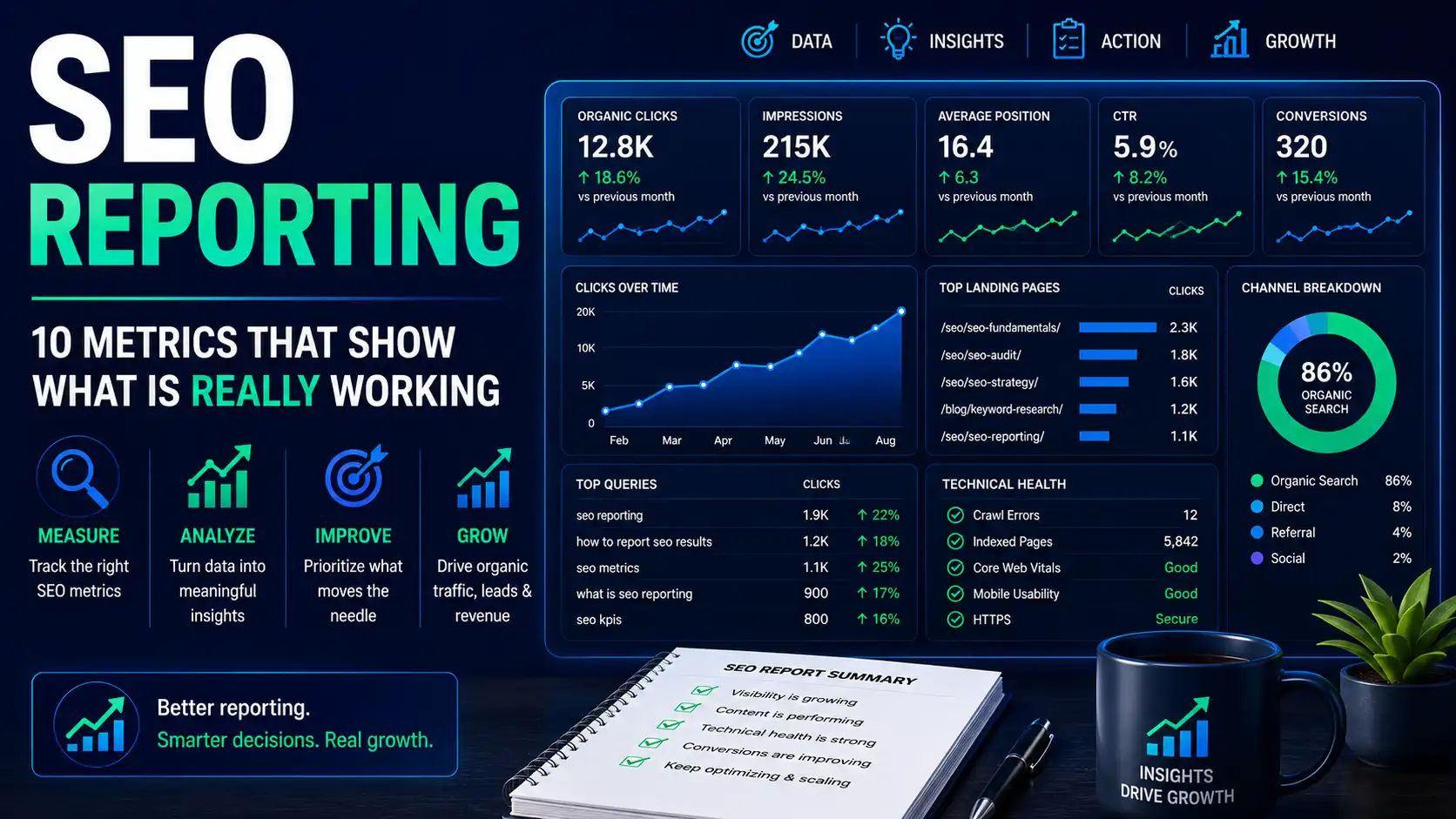
10 Important SEO Reporting Metrics
1. Organic Search Clicks
Organic clicks show how many visits Google Search generated from its search results.
This is one of the most useful top-level SEO metrics because it represents actual search-result clicks rather than estimated traffic.
Track:
- total clicks
- changes over time
- clicks by page
- clicks by query
- clicks by device
- clicks by country
Why Organic Clicks Matter
Suppose impressions rise by 50%, but clicks remain unchanged.
Your website is becoming more visible, but users are not clicking at the same rate.
That may indicate an opportunity to investigate:
- rankings
- search intent
- title presentation
- SERP competition
- changing search-result features
Clicks provide context that rankings alone cannot.
2. Organic Impressions
An impression generally occurs when your page is shown in eligible search results.
Impressions are valuable because they can reveal growing visibility before traffic increases significantly.
For a newer website, impressions may be one of the first signs that search engines are beginning to understand and surface the content.
For example:
Month 1: 3,000 impressions
Month 2: 8,000 impressions
Month 3: 22,000 impressions
Even if clicks remain relatively small, this trend may indicate that the site’s search footprint is expanding.
Use Impressions With Context
More impressions are not automatically better.
If a page begins appearing for irrelevant searches, visibility may rise without creating meaningful traffic.
Always evaluate impressions alongside:
- queries
- rankings
- clicks
- conversions
3. Click-Through Rate
Click-through rate, commonly abbreviated as CTR, compares search-result clicks with impressions.
A simplified formula is:
CTR = Clicks ÷ Impressions × 100
For example:
1,000 impressions and 50 clicks would produce a 5% CTR.
CTR can help reveal how effectively a search listing attracts clicks.
However, do not treat a universal CTR percentage as a required benchmark.
CTR varies greatly depending on:
- ranking position
- query type
- brand awareness
- SERP layout
- device
- search intent
- featured results
- local packs
- video results
- AI-powered search experiences
A useful approach is to compare similar pages and track changes over time.
4. Average Search Position
Average position can help indicate where a website or page tends to appear for queries.
It can be useful for spotting broad trends.
For example:
- a page moving from average position 35 to 16
- a commercial page moving from position 11 to 6
- a previously strong article declining from 4 to 12
These changes deserve investigation.
Do Not Obsess Over a Single Ranking Number
Search results vary based on:
- location
- device
- query context
- personalization
- SERP features
- timing
Rankings should therefore be interpreted as one signal among several.
A page with slightly lower average position may still produce more clicks and conversions.
5. Organic Landing Page Performance
One of the most useful SEO reporting views is performance by landing page.
Instead of asking only:
How much traffic did SEO generate?
ask:
Which pages generated the traffic?
For each important landing page, consider reporting:
- impressions
- clicks
- organic sessions
- conversions
- conversion rate
- revenue where relevant
This allows you to identify:
Winners
Pages gaining traffic and conversions.
Emerging Opportunities
Pages receiving impressions but not yet many clicks.
Declining Pages
Pages losing visibility or traffic.
Underperformers
Pages receiving traffic but failing to produce useful actions.
Page-level reporting makes SEO much easier to act upon.
6. Keyword and Query Performance
Keywords remain useful for understanding search demand, but SEO reporting should avoid turning into a giant spreadsheet of ranking positions.
Group queries meaningfully.
For example:
Branded Queries
Searches containing your brand or name.
Non-Branded Queries
Searches where users are discovering you through a topic rather than already knowing the brand.
Informational Queries
Searches focused on learning.
Commercial Queries
Searches indicating research before a purchase.
Transactional Queries
Queries showing stronger action intent.
Understanding intent is critical here. Our guide to search intent explains why two keywords with similar search volume may have completely different business value.
Track Keyword Themes, Not Just Individual Words
Suppose one SEO guide begins appearing for:
- SEO fundamentals
- SEO basics
- SEO for beginners
- basic SEO concepts
- how SEO works
Those queries collectively represent a topic.
Reporting the entire topic can sometimes tell a more useful story than tracking one exact keyword.
7. Organic Conversions
Traffic becomes significantly more valuable when visitors take meaningful actions.
Depending on your website, conversions may include:
- contact form submissions
- purchases
- appointments
- quote requests
- newsletter subscriptions
- trial registrations
- phone calls
- resource downloads
- affiliate clicks
Your report should distinguish between general traffic and traffic that contributes to business goals.
Example
Imagine two articles:
Article A
10,000 monthly organic visits
5 leads
Article B
1,500 monthly organic visits
45 leads
Which page is more valuable?
That depends on the business model, but Article B may deserve significantly more attention despite having less traffic.
This is why reporting traffic without conversion data can be misleading.
8. Organic Conversion Rate
Conversion rate adds another layer of context.
A simplified calculation is:
Organic conversion rate = Organic conversions ÷ relevant organic visits × 100
Suppose:
Month 1:
10,000 organic sessions
200 conversions
2% conversion rate
Month 2:
15,000 organic sessions
210 conversions
1.4% conversion rate
Traffic grew substantially, but conversion efficiency declined.
That insight may lead to questions such as:
- Did the new traffic have weaker commercial intent?
- Did a landing page change?
- Did the conversion process break?
- Did informational traffic grow faster than commercial traffic?
This is far more useful than simply celebrating traffic growth.
9. Indexed Pages and Technical Health
SEO reporting should include technical signals when they materially affect performance.
You do not need to place every crawler warning in a monthly executive report.
Instead, track meaningful issues such as:
- important pages not indexed
- unexpected indexing increases
- major crawl problems
- server errors
- broken internal links
- redirect problems
- sitemap issues
- Core Web Vitals trends
If you’re still building your understanding of how discovery and indexing work, the guide to how search engines work provides useful context for interpreting these signals.
Report Technical Issues by Impact
Instead of writing:
237 technical issues detected.
write:
Three priority product categories were unintentionally excluded from indexing. The issue was corrected on August 12, and indexing will be monitored during the next reporting cycle.
That explanation is much more useful.
10. Backlinks and Referring Domains
Links can still provide valuable information about a site’s authority and content distribution.
Relevant reporting metrics might include:
- new referring domains
- lost referring domains
- backlinks to priority pages
- broken pages receiving external links
- links earned by new content
- important brand mentions
Avoid reporting backlink quantity without context.
Ten relevant links from credible industry websites may be more meaningful than thousands of automated or irrelevant links.
The question should not simply be:
How many backlinks did we get?
Instead ask:
Did we earn links that strengthen important pages or increase our credibility within the topics we want to own?
Report Business Outcomes, Not Vanity Metrics
A vanity metric is a number that may look impressive but provides little evidence of meaningful progress.
Examples can include:
- total keyword count
- total backlink count
- raw pageviews
- arbitrary SEO scores
- number of articles published
These metrics are not always useless.
The problem occurs when they are presented without context.
For example:
We published 25 articles this quarter.
That describes activity.
A stronger report might say:
We published 25 articles across two priority SEO clusters. Twelve have begun receiving non-branded impressions, six are generating organic clicks, and two have already contributed newsletter signups.
Now the activity is connected to an outcome.
Branded vs Non-Branded Organic Search
Separating branded and non-branded performance can make SEO reports much more meaningful.
Branded Search
Users already know the brand and search for things such as:
- company name
- website name
- product name
- founder name
Non-Branded Search
Users search for a problem, topic, service, or product without already searching specifically for you.
Examples might include:
- SEO reporting guide
- technical SEO checklist
- keyword research process
- how search engines crawl websites
Non-branded visibility can be particularly useful when evaluating whether your content strategy is reaching new audiences.
Track Performance by Topic Cluster
If your website follows a pillar-and-cluster architecture, report performance at the cluster level.
For example:
SEO Foundations
Combine performance from articles covering:
- SEO fundamentals
- how search engines work
- search intent
- SEO glossary
- SEO strategy
- SEO project planning
- SEO audit
- SEO reporting
Then ask:
- Are cluster impressions increasing?
- Which pages attract the most clicks?
- Which queries are emerging?
- Are supporting pages strengthening the pillar?
- Are visitors moving between related articles?
- Does the cluster contribute conversions?
This is often more useful than judging every article independently.
Measure New Content Separately
New articles should not always be compared with pages that have existed for several years.
Create a reporting segment for recently published content.
Track:
Discovery
Is the page being crawled and indexed?
Impressions
Has it started appearing for relevant searches?
Query Expansion
Is it beginning to appear for more relevant queries?
Click Growth
Are impressions turning into visitors?
Conversions
Are those visitors taking meaningful actions?
This creates a realistic progression:
Published → Discovered → Indexed → Impressions → Clicks → Engagement → Conversion
Not every article will move through those stages at the same speed.
How to Report Content Declines
SEO reports should not hide negative performance.
Declines can contain some of the most valuable insights.
If an article loses traffic, investigate:
- search demand
- rankings
- competitor improvements
- content freshness
- search intent
- internal links
- SERP changes
- technical changes
- seasonality
Then report the finding clearly.
For example:
Organic clicks to the guide declined 23% month over month. Impressions remained relatively stable, but average visibility declined for several high-volume queries. The page has been added to the refresh queue for competitor review, content updating, and internal-link improvements.
That is much more useful than displaying a red percentage with no explanation.
Month-Over-Month vs Year-Over-Year Reporting
Different comparisons answer different questions.
Month Over Month
Useful for identifying recent changes.
For example:
August vs July
However, monthly comparisons can be heavily affected by:
- seasonality
- holidays
- campaigns
- publishing schedules
- short-term fluctuations
Year Over Year
Useful for understanding longer-term change.
For example:
August 2026 vs August 2025
This can provide better context for seasonal businesses.
Use Both When Appropriate
A mature SEO report may include:
- month-over-month change
- year-over-year change
- long-term trend
Do not make strategic decisions based on one short comparison alone.
How to Build an SEO Report
A professional SEO report can be structured in seven sections.
Section 1: Executive Summary
Start with the most important information.
Include:
- overall performance
- major wins
- major problems
- business impact
- next priorities
Keep this section short enough that a decision-maker can understand the situation quickly.
Example
Organic search continued to grow this month, with clicks increasing 14% and non-branded impressions increasing 22%. Growth was concentrated in the SEO Foundations cluster. Organic leads increased by 8%. Two declining legacy articles have been prioritized for refresh, while the next production cycle will expand the keyword research cluster.
That paragraph is more useful than twenty charts with no interpretation.
Section 2: KPI Overview
Include the primary KPIs.
For example:
| KPI | Previous Period | Current Period | Change |
|---|---|---|---|
| Organic Clicks | 8,200 | 9,350 | +14% |
| Organic Impressions | 410K | 500K | +22% |
| Organic Leads | 125 | 135 | +8% |
| Organic Conversion Rate | 1.52% | 1.44% | -5% |
Do not overload the KPI section.
Choose the numbers that matter most.
Section 3: Search Visibility
Analyze:
- impressions
- clicks
- CTR
- rankings
- query themes
Explain major changes rather than listing them.
Section 4: Landing Pages
Highlight:
- strongest pages
- fastest-growing pages
- declining pages
- emerging opportunities
- conversion-driving pages
Section 5: Content and Technical Progress
Report work completed during the period.
Examples:
- articles published
- articles refreshed
- indexing issues fixed
- internal links improved
- redirects corrected
- schema updated
Then explain what impact you expect those changes to have.
Section 6: Conversions and Business Impact
Show what organic traffic produced.
Depending on the business:
- leads
- revenue
- purchases
- calls
- signups
- bookings
- trials
This should become one of the most important parts of the report.
Section 7: Recommendations and Next Actions
Every report should end with clear actions.
For example:
- Refresh two declining high-value articles.
- Add internal links to three emerging pages.
- Expand the highest-performing topic cluster.
- Investigate conversion decline on a key landing page.
- Resolve two remaining indexing issues.
A report should lead naturally into execution.
SEO Reporting for a New Website
New websites require different expectations.
You may not have significant organic traffic yet.
Early indicators can include:
- successful indexing
- increasing impressions
- growing query count
- improving average positions
- first organic clicks
- first non-branded visitors
- first conversions
The reporting narrative might progress like this:
Stage 1
Pages are being discovered and indexed.
Stage 2
Relevant impressions begin appearing.
Stage 3
Rankings improve and query coverage expands.
Stage 4
Organic clicks begin increasing.
Stage 5
Traffic begins producing conversions.
Expecting immediate large traffic numbers can lead to poor decisions.
Measure progress according to the site’s stage of development.
SEO Reporting for Established Websites
Established sites can use more advanced reporting.
Consider monitoring:
- year-over-year traffic
- content decay
- topic-cluster performance
- branded vs non-branded traffic
- commercial landing pages
- SEO-assisted revenue
- lost rankings
- content refresh outcomes
- competitor movement
Large websites may also need reporting by:
- category
- country
- language
- device
- product line
- business unit
SEO Reporting for Local Businesses
Local SEO reports may include:
- local organic traffic
- location-page performance
- phone calls
- form submissions
- direction requests
- appointment bookings
- local query visibility
- Google Business Profile performance
The most useful metrics should reflect how local customers actually interact with the business.
SEO Reporting for Ecommerce
Ecommerce SEO reporting should connect visibility directly to revenue.
Important metrics can include:
- organic revenue
- organic transactions
- conversion rate
- average order value
- category-page performance
- product-page performance
- non-branded commercial visibility
- revenue by organic landing page
Do not celebrate traffic growth if ecommerce revenue is declining.
Investigate the full funnel.
SEO Reporting Tools
Several tools can contribute to an SEO reporting system.
Google Search Console
Search Console is especially useful for:
- clicks
- impressions
- queries
- pages
- countries
- devices
- search appearance
- indexing information
Google Analytics
Analytics can help connect organic visits with behavior and conversions.
Useful data may include:
- landing pages
- engagement
- events
- conversions
- revenue
Rank Tracking Platforms
Rank trackers can help monitor selected keywords consistently.
They are particularly useful for:
- priority commercial queries
- local rankings
- competitor comparisons
- historical keyword movement
Website Crawlers
Crawlers can provide recurring technical information such as:
- status codes
- broken internal links
- canonicals
- titles
- headings
- crawl depth
- indexability
Reporting Dashboards
Dashboard tools can combine information from different data sources.
However, automation should not eliminate interpretation.
A dashboard showing 40 charts is not automatically a good SEO report.
Automate Data, Not Thinking
SEO reporting can become time-consuming.
Automation is useful for:
- importing data
- updating dashboards
- calculating changes
- creating recurring reports
But the analysis still requires human judgment.
A reporting system should not automatically declare:
Traffic decreased, therefore SEO failed.
You need to understand why.
Possible explanations might include:
- seasonal demand decreased
- a brand campaign ended
- irrelevant traffic disappeared
- search-result layouts changed
- conversions actually increased despite lower traffic
Numbers require context.
Common SEO Reporting Mistakes
Reporting Too Many Metrics
More data does not necessarily create more insight.
Focus on metrics tied to objectives.
Reporting Rankings Without Context
A ranking increase matters only if the keyword is relevant and capable of producing useful visibility or business value.
Ignoring Conversions
Traffic without outcomes provides an incomplete picture.
Using Estimated Traffic as Actual Traffic
Many SEO platforms estimate competitor traffic.
Do not present estimates as verified analytics data.
Treating Correlation as Causation
A ranking increase after a page update does not automatically prove that one specific change caused the improvement.
Hiding Negative Results
Declines should be investigated, not removed from reports.
Reporting Without Recommendations
Data without a next step has limited strategic value.
Focusing Only on Google Rankings
SEO performance can involve discovery, brand visibility, user journeys, conversions, and increasingly diverse search experiences.
Keep the broader objective in mind.
Create a Reporting Rhythm
SEO reporting works best when it follows a consistent schedule.
Weekly Monitoring
Use weekly monitoring for:
- serious technical problems
- unusual traffic changes
- indexing issues
- important launches
Avoid overreacting to normal daily fluctuations.
Monthly Reporting
Monthly reports are useful for:
- KPI trends
- content performance
- conversions
- completed work
- next priorities
For many organizations, monthly reporting is the most practical standard.
Quarterly Reviews
Quarterly reviews should be more strategic.
Ask:
- Is the overall strategy working?
- Which topic clusters should we expand?
- Which content needs refreshing?
- Which pages contribute the most business value?
- Where should resources shift?
- What should we stop doing?
Quarterly reporting should influence the next stage of the SEO roadmap.
A Simple SEO Reporting Framework
If you want to keep your SEO reporting simple, use this framework:
1. Objective
What are we trying to achieve?
2. Visibility
Are impressions and relevant rankings improving?
3. Traffic
Are more qualified users arriving through search?
4. Content
Which pages and clusters are driving performance?
5. Conversions
Are organic visitors taking valuable actions?
6. Technical Health
Are any important SEO problems limiting growth?
7. Actions
What should we do next?
This structure works for both small websites and larger SEO programs.
SEO Reporting Checklist
Before sending an SEO report, confirm the following.
Goals
- SEO objectives are clearly defined.
- KPIs relate to business outcomes.
- The reporting period is clear.
Search Performance
- organic clicks reviewed
- impressions reviewed
- CTR reviewed
- ranking trends reviewed
- query performance reviewed
Content
- top landing pages identified
- growing pages identified
- declining pages identified
- new content reviewed
- topic clusters evaluated
Conversions
- organic conversions tracked
- conversion rate reviewed
- revenue or lead value included where available
Technical SEO
- major indexing problems reviewed
- crawl problems reviewed
- important technical changes documented
Authority
- meaningful new referring domains reviewed
- lost important links investigated
- priority-page authority considered
Analysis
- important changes explained
- unusual trends investigated
- wins documented
- problems documented
Next Steps
- recommendations are prioritized
- owners can be assigned
- actions connect back to the SEO strategy
Final Thoughts
The purpose of SEO reporting is not to prove that SEO work happened.
It is to understand whether SEO work is creating progress.
A useful reporting process follows this sequence:
Measure → Compare → Investigate → Explain → Prioritize → Act
Traffic matters.
Rankings matter.
Links matter.
Technical health matters.
But none of these metrics should be viewed in isolation.
The strongest SEO reports connect visibility with people, pages, conversions, and business outcomes.
Instead of asking only:
Did our rankings increase?
ask:
Are more of the right people discovering our website, finding useful information, and taking actions that support our goals?
That is the question your SEO reporting system should ultimately help answer.